
CentralSquare Power BI dashboards for police and sheriff's offices
The build reads the export or read-only view your CentralSquare system already produces, so a different records system changes the field names, not the work. What comes out is a monthly crime, calls for service and case report in Power BI that refreshes on a schedule and is ready on the first of the month.
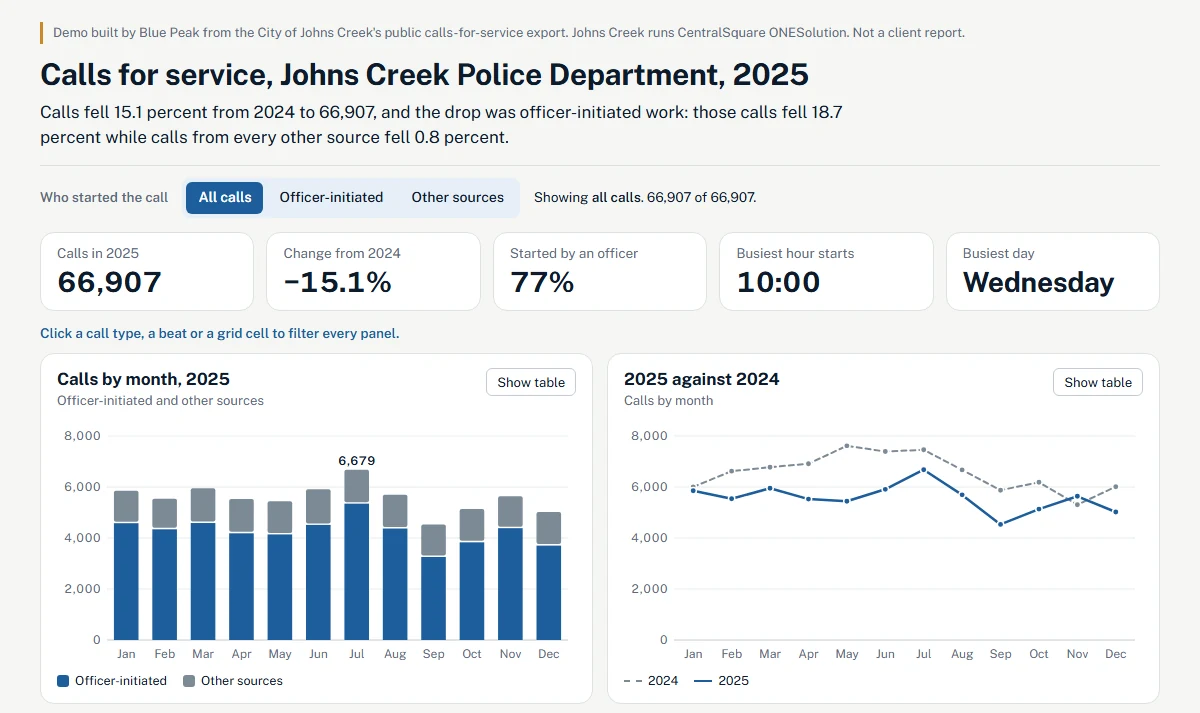
What the monthly report covers
The pages command staff, a city manager or a county commission ask for every month. The counts come from your CentralSquare data and the layout follows the monthly report you already send.
- Crime. Offenses by category for this month, last month, the same month last year and year to date, grouped the way your state NIBRS file is grouped, so the dashboard number and the number you submit come from one definition.
- Calls for service. Calls by hour, day of week, beat and priority, with response time from call received to first unit on scene shown as a median and a spread, so one long call does not move the number.
- Cases. Cases by status, how long open cases have been open, and clearance by offense type, so a supervisor sees what is stuck without pulling a list.
- Monthly command staff packet. The same layout every month, refreshed on a schedule, then emailed by the Power BI service or exported to PDF for the council packet; the council version is on the monthly police report page.
From the export we ask for the incident or case number, the offense or NIBRS code, the report date and time, the location or beat, the call received, dispatched and on-scene times, the call nature and priority, and the case status and cleared date, whatever your system calls them.
Which CentralSquare do you run?
CentralSquare is the company on the invoice. The product under it is usually one of three, and the name your analyst uses tells us what to ask for.
- Public Safety Pro Suite (Zuercher). The Zuercher name sits under Pro Suite. Whichever your staff say, use it when you write to us and name the modules you run: dispatch, records, jail.
- ONESolution. Older contracts and purchase orders may still carry the earlier names Superion or SunGard. Name the modules you run: dispatch, records, jail.
- Enterprise (TriTech). The Enterprise line carries the TriTech name. Name the modules you run: dispatch, records, jail.
For all three the question is the one we answered at Riley County: how does the data come out? A scheduled export, a report the system already produces, or a reporting database your IT can point an ODBC or SQL connection at. Any of the three is enough for a build.
How a build runs
The same four steps on every Blue Peak project. Your agency keeps control of the data at every one of them.
- Your staff set up the data path. Your IT staff, or your vendor's support desk, set up whichever is easiest: a scheduled export, a report the system already produces, or, where your agency has a reporting database and the vendor allows it, a read-only ODBC or SQL connection. We do not need a login to your live system to start, and on a first project we usually do not ask for one.
- We read the export and write down what it means. We list the fields, ask about every ambiguous one, and write down what each means in your agency: what counts as a call, when a case counts as cleared, which offenses roll up to which category. Each definition lives once in the data model, not on every report page.
- We build it in your tenant, or host it. The report is built and published in your own Microsoft tenant, with no annual license from us and no seat count. If you would rather not publish and maintain it, we host it through Blue Peak Dashboards as one flat monthly subscription, and the hosted pages carry counts and figures you clear for it. Records with names, plates or case narratives stay in your own systems.
- You get the template. You get the Power BI template and the .pbix file, the documentation, and a working session with whoever will maintain it, so your analyst can refresh and change the report without calling us. If you never call again, it keeps running.
Where the proof comes from
Blue Peak is building a Power BI report set for the Riley County Police Department in Manhattan, Kansas, on the department's Spillman Flex system. The connection is a read-only ODBC link to the Flex database that RCPD's own staff set up. The report pages cover crime statistics, calls for service, maps, investigations and case tracking. It ships as a Power BI template that RCPD opens and refreshes inside its own environment.
The Johns Creek and Norman demos were built from public exports with no agency involvement.
More on police work: Power BI dashboards for police departments, the public safety demo built from records the Olathe Police Department publishes, and the pages for Omnigo and Tyler New World.
Agencies that run CentralSquare
Agencies in Missouri that run CentralSquare include the Jackson County Sheriff's Office (county resolution, November 2023), the City of Cameron (city council resolution, October 2024), the City of Joplin (city council bill, April 2026) and the Cass County Emergency Services Board (CentralSquare press release, October 2024).
We name them only to show where the system is used, from each agency's own public record or the vendor's press release, with the date of that record. None of them is a Blue Peak client, and we hold no data from any of them. Agencies change systems, so read each name as true on the date shown.
Questions
Which records systems have you built on?
Our first production build is on Spillman Flex. Yours would read your CentralSquare export the same way; the Johns Creek demo on this page was built from the calls-for-service export Johns Creek publishes, and Johns Creek runs CentralSquare ONESolution.
We run Pro Suite, ONESolution or Enterprise. Does the product matter?
Tell us which one and which modules, because they affect what your analyst can export. The build reads whatever comes out: a scheduled export, a report the system already produces, or a reporting database. The counting rules and the report pages are the work, and those are the same whichever system fills the tables.
Can Power BI connect straight to CentralSquare?
Sometimes, and when it cannot, an export does the job. Power BI reads anything with an ODBC or SQL connection, which is how the Spillman Flex build works. Where your vendor does not allow a direct connection, a scheduled CSV or Excel export, or a report the system already produces, is enough. Your IT staff, or your vendor's support desk, can usually tell you in one email which of those you have.
Do we have to give you access to our CentralSquare system?
No. On a first project we usually do not ask for it. Your staff produce the export and choose what is in it. If your agency prefers a live connection, it is read-only and set up by your own staff, the way the Riley County connection to Spillman Flex was. Where agency policy rules out an outside account, exports are enough.
Can one report cover both calls and cases?
Usually. Calls for service come from the dispatch side of the system and incidents and cases from the records side. If both come out as exports, we join them on whatever number the two share, and confirming that number is one of the first things we do with you.
How long does it take, and what does it cost?
Three to eight weeks for a first dashboard, from the day we have your export in hand. The clock is usually set by how quickly your IT can produce a clean export, not by the build. It is quoted in writing from a written scope. A build in your own tenant carries no annual license fee from us and no seat count. If we host the dashboards for you, that is one flat monthly subscription, quoted with the build.
Where does our data live, and who owns the dashboard?
On a standard build it stays in your environment: reports are built and published in your own Microsoft tenant and never copied to a Blue Peak server. If we host the dashboards, the hosted pages carry counts and figures you clear for it, and records with names, plates or case narratives stay in your own systems. The .pbix file, the data model and the documentation are yours either way.
CentralSquare, Pro Suite, Zuercher, ONESolution, Superion, SunGard, TriTech, Spillman Flex and the other product and program names on this page are trademarks of their owners. Blue Peak Data Consulting is an independent firm and is not affiliated with or endorsed by any of them.
Free first page
Send one month of your export and we build the first page at no cost. If it does not match your own counts, you owe nothing and keep the file.
Blue Peak Data Consulting, Olathe, Kansas. Police departments and sheriff's offices in Kansas, Missouri and across the country.
(913) 777-4770 · sergei@bluepeakdataconsulting.com